Nulane applications
The right record for each kind of work.
Damage inspections, vehicle milestones, audit records, shift handoffs. Our apps turn the work performed in the field into information the next person can use.
01 / Vehicle damage documentation
DocuDent
Vehicle damage documentation, from a confirmed VIN to a completed report.
- For
- Inspectors and the yard, fleet, or logistics teams reviewing vehicle condition.
- Field work
- Confirm the vehicle, classify damage, attach photos and notes, then review and submit.
- Management
- Find submitted records, inspect their evidence, and connect reports to operational status.
- Output
- A report containing vehicle details, damage entries, a visual damage chart, photos, and inspector information.

02 / Supporting application
DocuFit
Vehicle milestones and readiness, defined around your organization’s lifecycle.
Explore milestone tracking- Manages
- Checkpoints and the history of what has happened to a vehicle while it is in the organization’s system.
- Field work
- Submit a milestone using the configured template and required fields.
- Management
- Review milestone history and organization-defined readiness indicators before the next handoff.
- Output
- A shared vehicle history with consistent milestone submissions.
03 / Configurable operational modules
Specific workflows.
A shared foundation.
These examples use the same building blocks: structured capture, evidence, roles, workflow states, and reporting. The fields and rules are scoped to the work being managed.
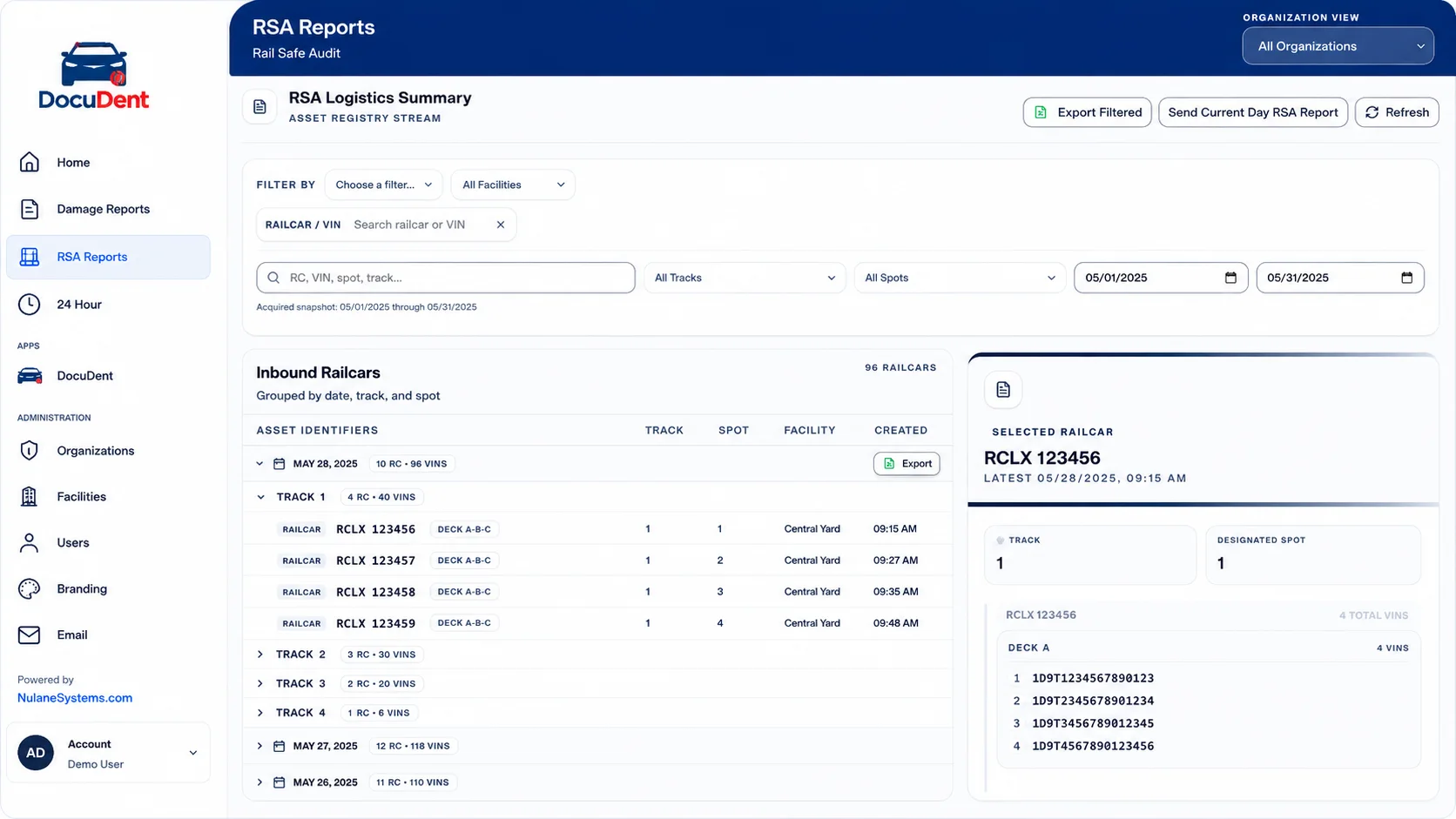
01Railcar & bay audits
Record activity in the context of a date, track, spot, deck, or bay. Review the vehicles attached to the selected record.
Locate an audit by operational context and inspect the detail behind it.
Structured audit records, vehicle-level detail, and filtered exports.
02Company vehicle checkout
Capture who is taking a vehicle, its condition, required acknowledgements, and the return handoff.
Review custody and condition without reconstructing the handoff from messages.
A checkout and return record with the required condition evidence.
03Start-of-day / end-of-day reporting
Record shift activity, outstanding work, and exceptions using the operation’s reporting fields.
Compare consistent shift summaries and see what the next team needs to pick up.
A structured shift report and a clear record of unresolved items.
04Time-sensitive inventory
Connect incoming inventory to inspection activity and the available report.
Separate complete, uninspected, critical, and overdue work; filter by facility.
Timing and status at vehicle level, report links, and exportable inventory.
Where configuration starts
We agree on the record, required evidence, user roles, handoff rules, and outputs first. Branding and integrations follow that scope. This gives each implementation a defined purpose and a maintainable product foundation.
Let’s look at the work
Bring the form, spreadsheet, or handoff you want to improve.
Bring your current process. We’ll walk through the product, the handoffs, and the configuration your team would need.